Installer
RecommendedInstalls for your user only, no admin needed. Updates itself from inside the app if you allow it.
Download installerTidegate is a free client for SSH, SFTP, RDP, VNC, serial ports and more, on Windows, macOS and Linux. Your hosts, keys and passwords are kept in one encrypted file on your own computer. You do not need an account, and nothing is stored online.
Free. Windows 10 and 11, 64 bit.
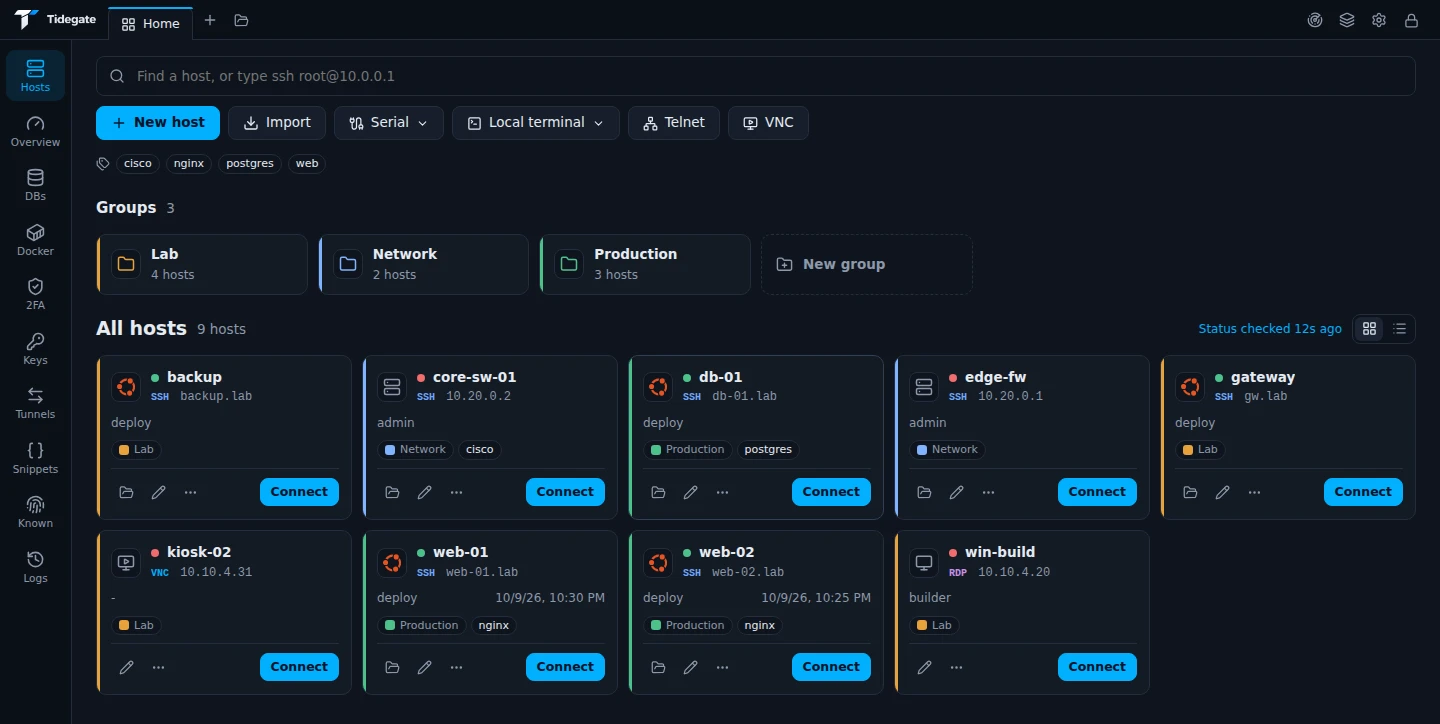
Screenshots from the app, with made up hosts.
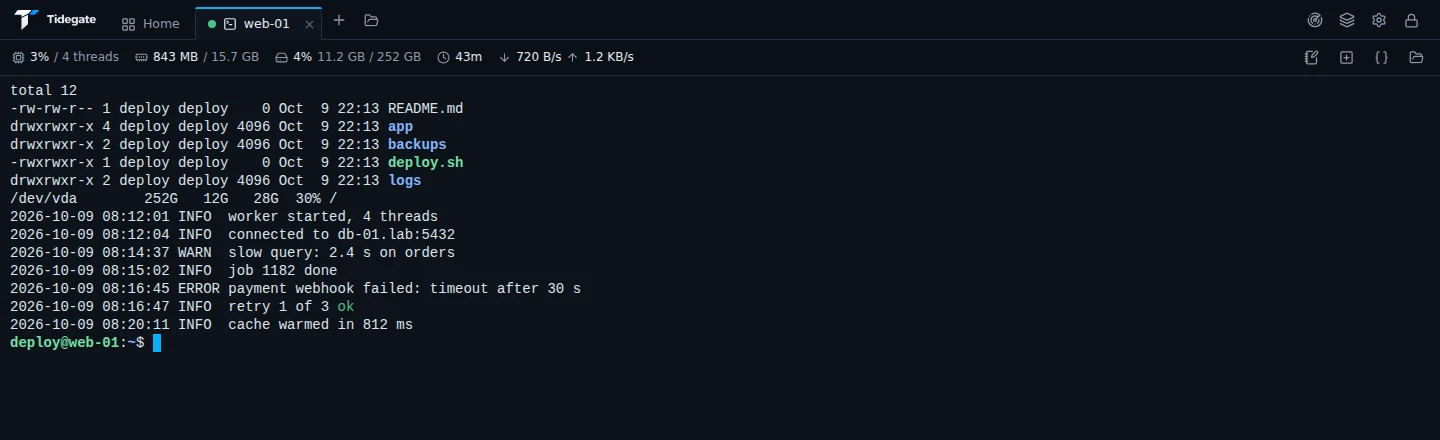
Each SSH tab shows CPU, memory, disk, uptime and network speed of the server, read on the same connection.
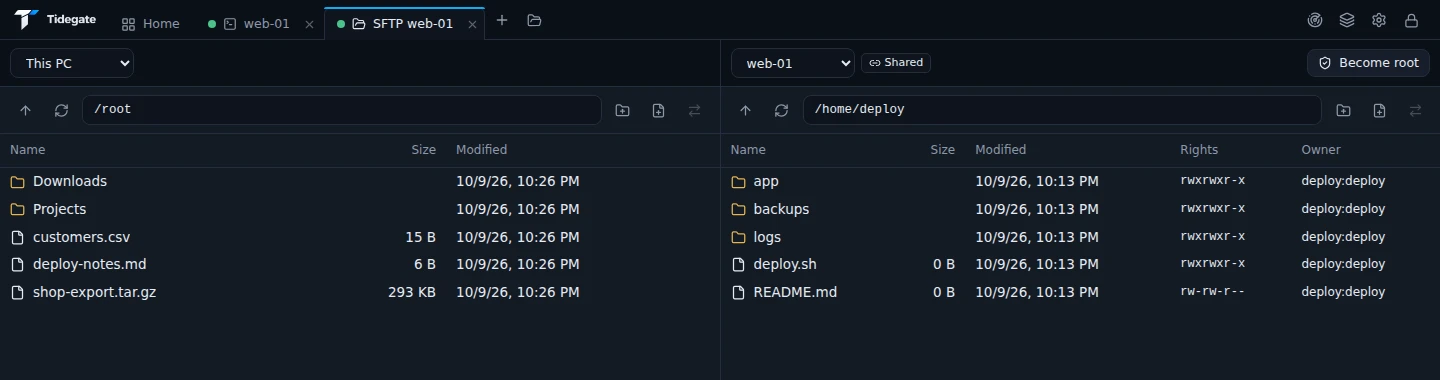
Two panes, this PC or any host on each side. Drag files across. Opening files from a terminal reuses its login.
Drag a host onto a group to move it. Groups can hold a default user, key and jump host.
The things you use every day are on the main screens. Things you need now and then are in menus and settings. The docs explain each one.
sudo or su, on the same connectionrz and szWhat keeps your hosts, keys and passwords safe.
Hosts, passwords, keys and 2FA codes sit in one file on your computer, locked with your master password. AES-256-GCM, with the key made by Argon2id.
There is nothing to sign up for and no copy online. Sync between your own computers goes through a folder you pick, encrypted.
No telemetry and no analytics. The update check is off until you say yes, and it sends nothing about you.
Every release is signed. Tidegate checks the signature and the file before it installs anything.
Auto lock, lock on sleep and on minimize. Unlock with Windows Hello, a security key or Touch ID.
A changed server key warns you, or blocks the connection in strict mode. Also through jump hosts and tunnels.
Windows 10 and 11, 64 bit.
Installs for your user only, no admin needed. Updates itself from inside the app if you allow it.
Download installerOne exe that runs without installing. Make a folder named data next to it and everything stays in that folder.
macOS 12 or newer, on Apple Silicon and on Intel.
Open it and drag Tidegate to Applications. When a new version is out, the app downloads it, checks it and opens it for you.
Download for Apple SiliconFor Macs with an Intel chip. Not sure? Open the Apple menu, About This Mac. It says Chip (Apple) or Processor (Intel).
Download for IntelRDP hosts open in Windows App from the App Store. Touch ID can unlock Tidegate. Security keys need Windows for now. Everything else works the same.
The first time, run xattr -dr com.apple.quarantine /Applications/Tidegate.app in Terminal after you drag Tidegate to Applications. Without it, macOS says the app is damaged, because Tidegate is not signed by Apple yet.
64 bit x86 (amd64). An AppImage for any distribution, and packages for Debian and Arch.
One file that runs on most distributions. Make it executable and start it. It updates itself in place if you allow it.
Download AppImageFor Debian, Ubuntu, Mint and others that use apt. Install it with your package tool. New versions are downloaded and checked for you.
Download .debFor Arch, Manjaro, EndeavourOS and others that use pacman. Install it with sudo pacman -U and the file name.
Use the AppImage. It runs on most distributions without installing anything, and it updates itself if you allow it.
The newest versions and what changed in them. This list updates by itself.
Loading the list from api.tidegate.net.
No. Tidegate is free, with no account and no paid plan.
In one encrypted file in your user folder: %APPDATA%\Tidegate on Windows, ~/Library/Application Support/Tidegate on macOS and ~/.config/Tidegate on Linux. The portable exe keeps it in the data folder next to itself. Nothing is kept anywhere else.
Then the vault cannot be opened. Nobody can get around the encryption, us included. On Windows you can also start without a master password. Tidegate then gives you a recovery code to keep somewhere safe, and you unlock with Windows Hello or a security key day to day.
Yes, also between Windows, macOS and Linux. Export makes one encrypted file. Copy it to the new computer, start Tidegate there and pick "Import from another PC". You choose at setup if SSH keys and 2FA codes may leave this PC at all.
Only if you say yes to update checks. Then it asks api.tidegate.net for the newest version when it starts and every 2 minutes. The request holds nothing about you. Everything else only connects to servers you open. See the privacy page.
If you allow it, Tidegate looks for a new version when it starts and every 2 minutes. A small box offers to download it. Tidegate checks the signature and the checksum, then installs it on Windows and with the AppImage, opens the disk image on a Mac, and shows the new package on Debian and Arch.
Yes. Monolith SSH is now Tidegate. Install Tidegate once over it and your hosts, keys and settings move along. From then on it can update itself.