Docs / Files
Files
The file view has two panes. Each side can be this computer or any host, over SFTP, FTP, FTPS or S3. Drag files from one side to the other.
Open the file view
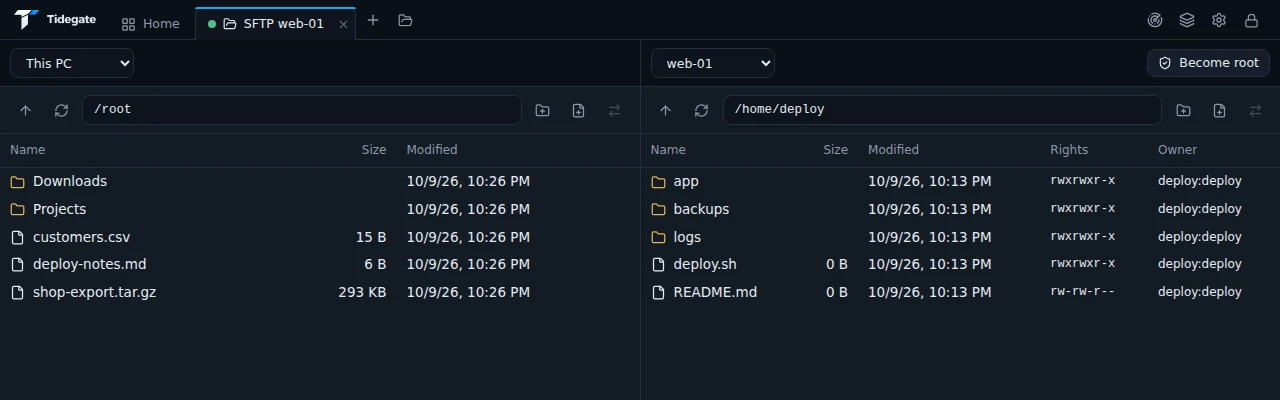
- From a terminal, click Open SFTP in the bar on top. It uses the same connection, so there is no second login.
- From the host menu, pick Open SFTP.
- The folder icon next to the tabs opens an empty file tab. Pick a side with the menu above each pane.
Drag files and folders between the panes, or right click and pick Copy to the other side. Right click also has rename, delete, new folder and permissions (644, 755 and so on).
Hidden files (names that start with a dot) are left out until you turn on Show hidden files under Settings, SSH and SFTP.
Become root
Files owned by root are often the ones you need to change. Become root at the top of a server pane switches the file session to root, on the same connection:
su -asks for the root password,sudoasks for your own password.
Each host can say which one to use, and save the password, in its Advanced options (SFTP as root). Leave root goes back to your normal user.
Edit and compare
Double click a text file on a server to open it in the built in editor. Saving writes it back, also as root.
Prefer your own editor? Turn on Open files in my own editor under Settings, App and tools, and pick the program. Saving in that editor uploads the file again, or asks first if you want that.
To compare two files, select both (in one pane, or one on each side), right click and pick Compare. They open side by side with the changes marked.
Files that could run a program on your computer, like .exe, .bat or .command, are never opened by double click without an editor program set.
FTP, FTPS and S3
Save an FTP or S3 host like any other host, and it opens in the same file panes.
- FTP and FTPS. Pick explicit TLS (recommended), implicit TLS (port 990) or plain FTP. "Check the certificate" really checks it. Accepting any certificate is a separate, clear choice.
- S3. AWS and S3 compatible storage like MinIO, Wasabi or Backblaze. Put the endpoint in the address field, then the region, bucket, access key and secret key. Path style is there for servers that need it.
Files in the terminal
With ZMODEM on (Settings, Advanced), run sz file.tar.gz on the server to download a file, or rz to upload one, without leaving the terminal. It works over SSH and serial.