Docs / Hosts and groups
Hosts and groups
A host is a server you connect to. Tidegate keeps hosts for SSH, RDP, VNC, Telnet, FTP and S3 in one list, sorted into groups.
Add a host
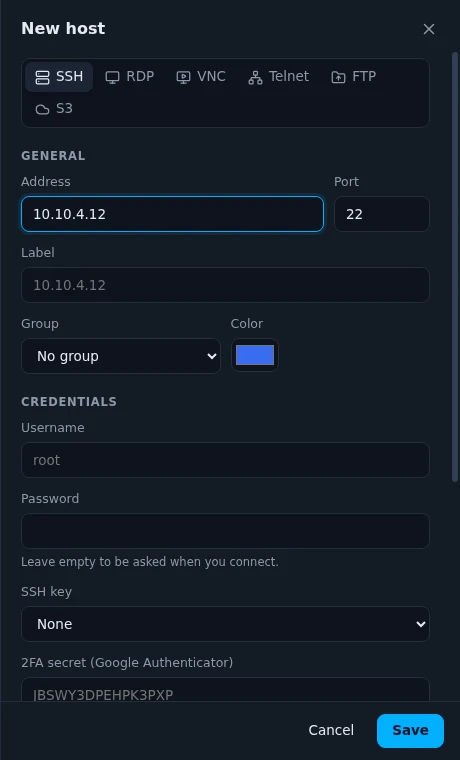
Click New host on the Hosts page. Pick the kind at the top, then fill in:
- Address and port. A name like
web-01.example.comor an IP address. The port follows the kind (22 for SSH, 3389 for RDP and so on) until you change it. - Label, group and color. The label is the name in the list. Without one, the address is used.
- Username and password. Leave the password empty to be asked when you connect.
- SSH key. A key from your keychain.
- 2FA secret. The base32 secret or the otpauth link from the server's 2FA setup. Tidegate then fills in the codes for you.
- Icon. Automatic shows the logo of the system (Ubuntu, Debian, Alpine and so on) after the first login. You can also pick an icon or use your own image.
Advanced options
Advanced is folded away. When something in it differs from the default, the heading says how many, so nothing hides from you.
| Option | What it does |
|---|---|
| Jump host | Connect through another SSH host first, like ssh -J. |
| SSH agent | Use the keys in your SSH agent (the Windows OpenSSH agent, Pageant, or SSH_AUTH_SOCK on macOS and Linux). Agent forwarding lets the server use them too, so only turn it on for servers you trust. |
| Tidegate certificate | Log in with a short lived certificate from your own CA. See SSH certificates. |
| X11 forwarding | Show Linux programs with windows on your computer. Needs an X server on your side. |
| Allow old algorithms | For old switches and routers that only speak SSH from before 2015. See old network gear. |
| Run snippet after login | Types a saved snippet as soon as the terminal opens. |
| Keep alive | Sends a small message every few seconds, so routers do not drop an idle connection. |
| Proxy | Connect through a SOCKS5 or HTTP CONNECT proxy. |
| SFTP as root | How "Become root" works in the file view: su - or sudo. |
| Tags | Words for search and filters, like prod or customer-a. |
| Wake-on-LAN | The MAC address, so you can wake the machine from the host menu. |
Groups
Groups sit as cards above the host list. Drag a host onto a group to move it, or onto "All hosts" to take it out of its group. Deleting a group keeps its hosts.
A group can hold defaults: a username, a saved login, an SSH key and a jump host. A host in the group uses them when its own field is empty. Set the user once for a whole rack of servers.
Right click a group to run one command on all its SSH hosts. See run a command on many hosts.
Online status
Each card has a dot. Green means the host answers, red means it does not. Tidegate opens a quick connection to each host's port every 30 seconds. Nothing is sent and no login is tried.
You can turn it off, or change how often it checks, under Settings, App and tools.
The list can show cards or rows. Use the two buttons on the right, above the hosts.
The host menu
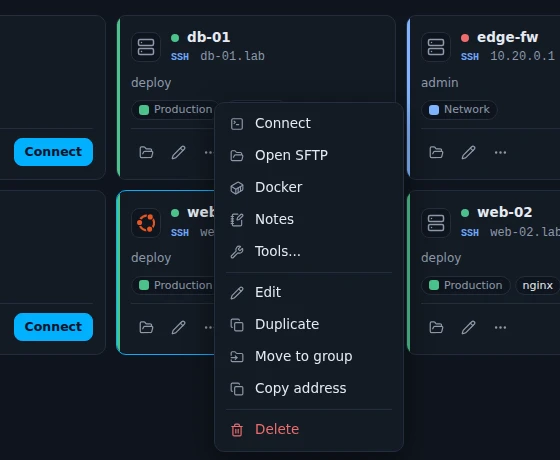
- Connect opens a terminal (or the remote desktop for RDP and VNC). A double click does the same.
- Open SFTP and Docker open those views for an SSH host.
- Notes are kept with the host, encrypted like everything else.
- Tools has Network tools, Open ports, Configuration backups and Wake up.
Search and quick connect
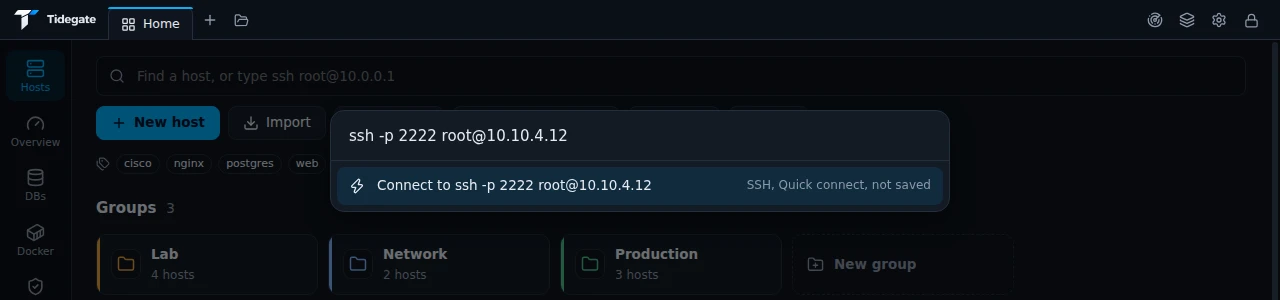
The search field on Hosts finds hosts by name, address, user, tag and notes. It also connects to something you have not saved, when you type it like a command:
| Type | Opens |
|---|---|
user@host or ssh user@host | SSH to port 22 |
ssh -p 2222 -l admin 10.0.0.5 | SSH with a port and user |
sftp -P 2222 user@host | The file view |
telnet 10.0.0.1 23 | Telnet |
vnc host:1 or vnc host::5901 | VNC by display or by port |
serial COM3 115200 or /dev/ttyUSB0 9600 | A serial port |
ssh://user@host:2222 | URLs work too |
Nothing typed this way is saved as a host, but it shows in your log and under the search field next time. Host keys are checked as always. Options Tidegate does not understand, like -i or -L, are refused rather than ignored.
Import hosts
Click Import on Hosts to bring hosts from:
- your
~/.ssh/configfile, - PuTTY sessions,
- MobaXterm sessions,
- a CSV file.
To move everything from another Tidegate, use an export instead. See moving to a new PC.
Old network gear
Old Cisco and HP switches often only know SSH from before 2015: sha1 key exchange, CBC ciphers and MD5. Modern SSH refuses them, and so does Tidegate unless you say so.
When a connection fails for that reason, the connect screen says "This server only knows old SSH" and offers Allow old algorithms and connect. That turns on the option for this host only. The old algorithms are added after the modern ones, so a modern server still gets modern encryption. Host keys are checked as always.